Forms
How to add a HIPAA-compliant form to your website

Your website is the hub of your practice. In just a few minutes, potential clients can find out who you are and what you offer, read through testimonials, and contact you as soon as they've decided that you're the perfect practitioner for them.
Most likely, you've included your practice phone number or email on your website, but sometimes potential clients aren't ready to pick up the phone, and they can't initiate a secure conversation with you through email unless they subscribe to secure email themselves.
You don't want potential clients to have even a hint of an obstacle once they decide to reach out, and for your peace of mind as a practitioner, you want that initial contact to be confidential. One of the simplest ways to ensure immediate, secure contact is to add a secure contact form to your website.
In today's post, we're going to explain why a secure, HIPAA-compliant contact form is so important for your practice and how to add one to your website.
Why a secure contact form is so important
There is a common misconception that, because a client-practitioner relationship hasn't been established yet, initial contact doesn't contain protected health information (PHI) and therefore doesn't need to be secure. However, HIPAA makes no distinction between what is and isn't PHI based on whether a relationship has been established; in fact, information submitted through even the most basic contact form is PHI.
A typical web form collects information that is sent to a third-party web form service, which then forwards it to you. If a third party is handling PHI on your behalf, as in the case of a contact form, it must provide you with a Business Associate Agreement (BAA) stating that the PHI is being handled securely. Few web form services offer a BAA or secure web forms. PHI collected via a non-secure web form service is vulnerable, as it travels from your client to the web form service and back to you.
That's why a secure contact form on your website is so necessary. Besides ensuring your communication with a client is secure and HIPAA-compliant from the start, a secure contact form is also a better option for potential clients who might otherwise reach out to you via the non-secure contact forms on other websites.
Earlier this year, we wrote about the problem with allowing potential clients to use the Email Me contact form on your Psychology Today profile. The form isn't secure. We advised that the best way to handle this is to disable the Psychology Today email feature and, instead, direct potential clients to the secure contact form on your website.
How to put a HIPAA-compliant form on your website
The quickest way to get your form out there is to link to it by copying its Hushmail-hosted URL, but in this post, we'll walk you through embedding it right on your website.
SSL certificate
First, you need to make sure you have an SSL certificate that ensures that the connection between a website and the browser is encrypted and secure. If you use a website service, there's a very good chance that your site has an SSL certificate, especially if the website service provides secure websites for healthcare professionals. If your site doesn't have an SSL certificate, you will receive the following notice when you try to embed a form:
Secure web forms can only be embedded in secure websites (https://).
This means you need to purchase an SSL certificate before you can embed a secure web form. Ask your web hosting provider what you need to do to obtain the certificate.
Use our template or build your own contact form
Once you know you have an SSL certificate, you're ready to put up your form. You can use our contact form template, which is ready to use immediately, or you can build your own with our form builder. A contact form doesn't have to be complicated. You might also want to consider a "Request an appointment" form. We provide a couple of form examples at the end of this post.
Keep in mind that forms with signature fields can't be put on your website because signatures must be traced back to the signer, and we do this through the email address.
Find the web form's HTML embed code
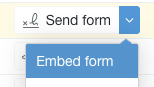
Next, find the form's HTML embed code by going to your Forms list, opening the drop-down menu to the right of the form, and selecting Embed form. You'll be given the code that you can copy and paste into your website.
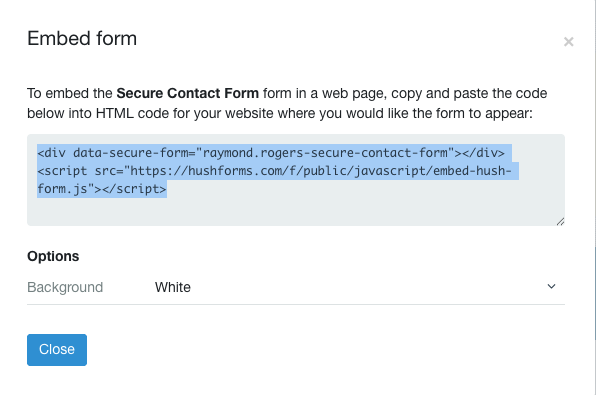
Once you have this code, you can either give it to your website designer or copy and paste it into your website's code. How you do this will depend on your website platform. Running a search on their help page for “add JavaScript” should give you the necessary information.
If you run into any snags, feel free to contact Customer Care, and we can help guide you in the right direction.
Examples of embedded web forms
Two Hushmail customers profiled as success stories on this blog have put Hushmail web forms on their websites to initiate conversations with potential clients and patients. Here are a couple of them so you can have a better idea of what an embedded Hush Secure Form looks like on a website.
Carol Park, LPC-S, RD, used our contact form template with a few slight adjustments. She placed it on her Contact Me page directly beneath the map to her office. Take a look at her very straightforward and effective use of our contact form template: https://www.recoveryreconnection.com/contact-me/
Ready to put a HIPAA-compliant contact form on your website?

|
Besides making it very easy to initiate contact with you, a secure contact form on your website is also a better option for potential clients who might otherwise reach out through the non-secure contact forms other websites provide. You can put a contact form on your website yourself. It just takes a couple of steps, which we'll walk you through. Related posts: |

.jpg?noresize&width=460&name=Therapist%20and%20client%20(3).jpg)