Compliance
A 6-step HIPAA compliance checklist for small healthcare practices
Estimated reading time: 8 minutes.
Summarize with ChatGPTEver feel like you might be missing something when it comes to HIPAA compliance? Like there's a gap you can't quite put your finger on.
It's not just you. HIPAA can be complicated. And when you're the only one carrying the responsibility, it can be tough to know whether or not you're checking all the right boxes.
That's why we created this six-step checklist. It's a straightforward way to give your practice a quick, meaningful compliance check-up. Use it at the start of each year, or whenever your processes change, to keep your practice on track.
This HIPAA compliance checklist is designed specifically for small healthcare practices that want clear, practical guidance without unnecessary complexity.
TL;DR:
Six HIPAA to-dos to make sure your practice is compliant and secure:
1. Review your Business Associate Agreements
Business Associate Agreements (BAAs) help ensure that the service providers you work with understand HIPAA, know how to keep your client data safe, and agree to do so. They're also required by the HIPAA Privacy Rule, which is the part of HIPAA that covers how client information is used and shared.

Many HIPAA-compliant service providers, including Hushmail, will provide you with a BAA, so you don't always have to create your own.
To-do checklist
Tips:
⭐ You don't need a BAA with companies that transmit information but don't store it, like landline phone services or couriers.⭐ Check your taxes or monthly bank statements to jog your memory.
Recommended resource if you want to learn more: Do you need a Business Associate Agreement?
2. Complete or update your HIPAA risk analysis
A risk analysis is the best way to spot gaps in your security practices.
The Office for Civil Rights (OCR) launched a risk analysis initiative in 2024 that stepped up enforcement in this area. As a result, doing a regular risk analysis is more important than ever.
This doesn't need to be complicated. A simple, honest review is a strong starting point.
And you can do a HIPAA risk analysis (aka risk assessment) on your own. You don't need to pay someone else to do it for you.
How often should you do one? At least once a year. You should also repeat it whenever there is a major change in your office (for example, new staff, new equipment, or services).
OCR has made it clear that regular, documented risk analyses are a core expectation under the HIPAA Security Rule. Proposed updates could go a step further by making the specifics of what must be done during those assessments mandatory.
If you haven't done one for a while (or ever), this is the perfect time!
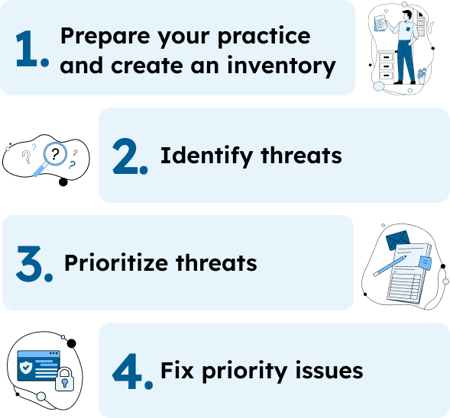
Risk analysis to-do checklist
Your HIPAA risk analysis is the anchor for the rest of the list. The steps that follow build on the systems and risks you've already identified here.
Recommended resource if you want to learn more: How to do your HIPAA risk assessment
And don't forget your free risk assessment template:

3. Use multi-factor authentication
Multi-factor authentication (MFA), also called two-step verification, requires you to verify your identity in at least two ways when you sign in. This includes your email, EHR, and other tools.
| One-step authentication | Two-step authentication |
|---|---|
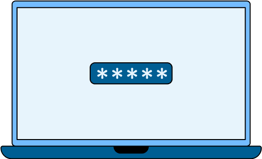
Something you know |
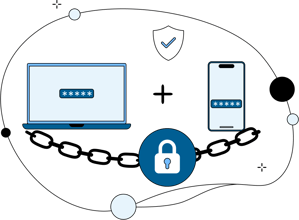
Something you know + something you have/are |
If this feels tedious, you're not alone. But as security expectations continue to rise, enabling two-step verification is one of the simplest ways to strengthen your safeguards. And it is a small price to pay in comparison to the costs of a breach.
Multi-factor authentication (MFA) checklist
Recommended resource if you want to learn more: Does HIPAA require multi-factor authentication?
4. Encrypt your data
Encryption scrambles sensitive information. Even if someone gained access to your systems, they wouldn't be able to read the data stored there.
With healthcare data breaches on the rise, encryption is a vital part of running a secure practice. The U.S. Department of Health and Human Services (HHS) highlighted its importance in the proposed HIPAA updates, suggesting it be made a mandatory requirement and giving it more focus.
Encryption checklist
⭐ With Hushmail, for example, encryption is built in. To use it, toggle the switch to "on."
⭐ If the services you use don't offer encryption, consider switching providers.
Recommended resource if you want to learn more: Does HIPAA require encryption?
5. Review your documentation
Your practice's documents and forms act as a written memory of key activities in your practice, and they are an essential part of demonstrating HIPAA compliance.
What documents are required by HIPAA? You need:
- Administrative policies and procedures
- Client-facing documents, including your Notice of Privacy Practices
- Agreements with third parties, including other clinics and service providers
- How you handle any crises, like data breaches
- Employee information and agreements (if you have staff)
Documentation checklist
Recommended resource if you want to learn more: HIPAA Documentation Requirements for Small Healthcare Practices Made Simple
And get your free HIPAA documentation checklist:

6. Review your data storage and disposal practices
As a healthcare provider, protecting client data is a top priority, even after clients leave your care. That's why it's critical to store and dispose of sensitive information in a HIPAA-compliant way (not to mention that you could face fines or other penalties if you skip these steps).
This applies to more than paper files. Even digital records or the devices that store them need to be housed and disposed of carefully.
Device-specific cheat sheet for destroying PHI
Here's a quick reference for common devices and how to properly destroy them:
| Device | ✅ What works | ❌ What doesn't work |
|---|---|---|
| Old laptops | Remove the hard drive + destroy it | Deleting files only |
| USB drives | Smash or shred | Just hitting "delete" |
| CDs/DVDs | Shred or break into pieces | Surface scratches |
| Old phones/tablets | Factory reset + physically destroy the device | Factory reset alone |
| Copier/printer memory | Wipe/remove memory before disposal | Returning without checking |
Storage and disposal to-do checklist
Recommended resource if you want to learn more: How to properly destroy PHI
Stay on top of HIPAA compliance
Running a HIPAA-compliant practice isn't a one-and-done solution; it's an ongoing process. With a simple annual review and tools that support you, you can protect your clients' privacy and run your practice with confidence. By taking time every year to review your compliance game, you're investing in your practice — and potentially avoiding a security breach or a failed audit.
This checklist is a great place to start. If you find it helpful, bookmark it for next year.
And using HIPAA-compliant tools like Hushmail can also take some of the load off your shoulders.
Reviewed by: Steven O. Youngman, VP of Legal and Compliance, Hushmail.