Forms
Secure email or secure forms? When should therapists use each
Estimated reading time: 5 minutes.
Summarize with ChatGPT
Pop quiz: Someone is visiting your website and decides you might be the right therapist for them. When they go to your Contact page to get in touch, what should they find?
- A contact form
- Your email address
Answer: Start with a secure contact form. After they've submitted their first message, you can switch to secure email.
Both secure forms and secure email serve a purpose when communicating with clients, prospective clients, practitioners, and others while running your practice. HIPAA compliance isn't about choosing one communication method. It's about using the right tool at the right stage of the client journey.
Here's how the two tools can work together to keep your communication protected, compliant, and efficient.
TL;DR: Secure forms and secure email serve different purposes in a therapy practice. Use secure forms to collect structured information or complete a specific task, and use secure email for ongoing conversations and document sharing.
- Use secure forms for first contact, intake information, consent, insurance details, questionnaires, referrals, and file uploads.
- Use secure email for replies, follow-ups, documents, referrals, and conversations with clients or other professionals.
- Use both as part of one workflow. Secure forms help you collect information efficiently, while secure email keeps the conversation going.
What to do next: Use a secure form when you need to collect structured information, and secure email when you need to continue a conversation.
Keep communication secure from the start
You know your clients' PHI is covered by HIPAA. But information a prospective client shares in an inquiry may also be PHI and must be safeguarded to comply with HIPAA.
That's why you should consider security at every touchpoint in the client journey, starting before someone officially becomes your client.
👉 For a refresher on what counts as protected health information, read What counts as PHI?
But it's not only about safeguarding information. It's also about ensuring a good client experience and keeping your business running smoothly.
That's where secure forms and secure email can work together.
Read on to learn the difference between the two tools and when you should use each one.
What is a secure online form?
An online form is a digital version of a paper form that you can complete and view online. A secure version safeguards sensitive information with encryption and protected storage.
A secure online form helps you:
- Receive first inquiries
- Collect structured information
- Get forms signed electronically
- Give clients a secure way to start a conversation
- Reduce back-and-forth emails
👉 Read to learn more: Online Forms Explained.
What is secure email?
Secure email is a security-enhanced alternative to regular email. It helps safeguard client communication, information, and documents in a private, password-protected online space, away from anyone who shouldn't have access. The HIPAA Privacy Rule allows covered healthcare providers to communicate with clients by email when reasonable safeguards are in place.
Secure email helps you:
- Reply to client and prospective client inquiries
- Continue conversations
- Share documents and other sensitive information
- Communicate with other providers, insurers, and medical billers
- Send referrals to colleagues
👉 Read to learn more: Is Sending Email Securely Enough? What Therapists Should Consider About Client Privacy
The difference between forms and email
While it might seem simpler to use just one tool for your small practice, secure forms and secure email each serve different purposes. They're both important for keeping communication secure and supporting HIPAA compliance.
Here's a quick guide to when each tool works best:
| Use a secure form for collecting structured information | Use secure email for ongoing communication |
|---|---|
| First contact | Replying to messages |
| Onboarding clients | Following up with clients |
| Getting informed consent | Sending documents |
| Collecting insurance information | Communicating with insurers and other practitioners |
| Providing self-administered questionnaires | Using templated responses |
| Receiving referrals | Sending referrals |
How secure forms and secure email can work together: An example
Because secure forms and secure email each serve different purposes, you'll often need to use both within a single workflow. Communication will naturally move from one tool to the other, depending on your needs at the moment.
For example, here's one way secure forms and secure email can work together to keep PHI safe and your practice running smoothly:
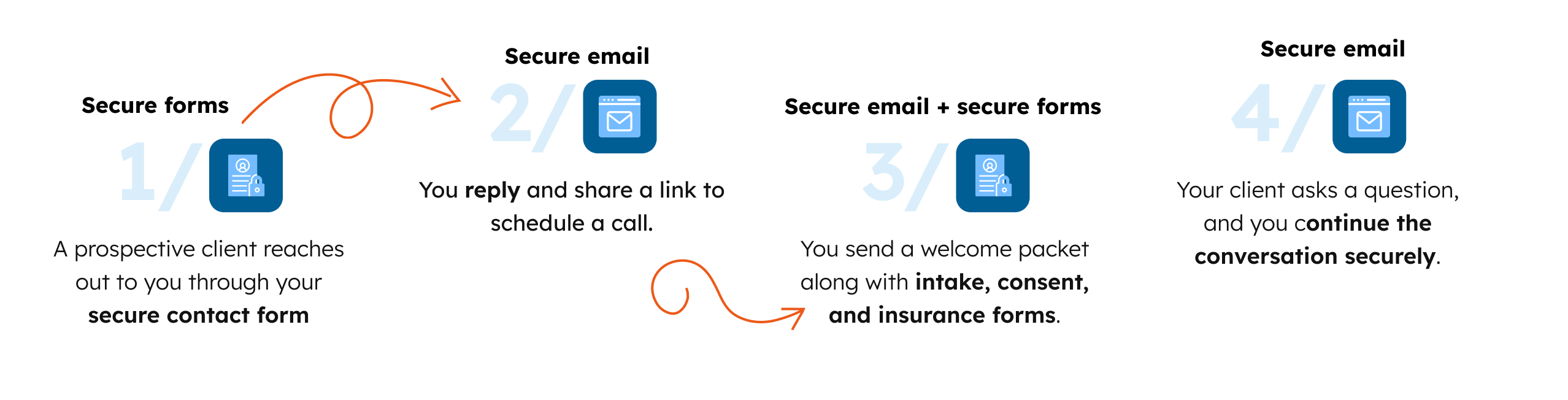
The right tool can change as the interaction moves from collecting information to having a conversation.
Frequently asked questions
Can someone email me directly?
Yes. If someone has your email address, they can email you directly, and you can't control what information they include. If a prospective client contacts you by regular email, move the conversation to secure email when you reply and use that secure channel going forward.
You can reduce the likelihood of prospective clients sending sensitive information through regular email by making a secure contact form the primary way to get in touch through your website.
Should I publish my email address on my website?
We don't recommend publishing your email address on your website. Instead, make a secure contact form the primary way for prospective clients to get in touch. That gives them a clear, secure place to send information from the start.
If someone has your email address and contacts you directly, move the conversation to a secure channel when you reply.
Can I use the form provided by my website service?
Website services like Squarespace often come with built-in forms. Squarespace, for example, says its Form Blocks can’t be used as part of a HIPAA-compliant solution. Even when you don't request sensitive health information, someone might include it in their message. Instead, add a HIPAA-compliant secure form to your website so sensitive information is protected from the start.
Can clients upload documents through a secure form?
Yes! A secure file transfer form allows you to receive confidential documents and files from your clients. It's a simple way to protect sensitive information and make file sharing easy, without using email attachments. Once the client submits the form, the files they uploaded are encrypted and protected.
Do I still need secure email if I have secure forms?
Yes. Forms aren't practical for ongoing conversations, and email containing PHI needs the right safeguards. For the best client experience and an efficient workflow, use a combination of secure forms and secure email.
Can I just use secure email for everything?
You could, but we don't recommend it. Secure forms create a better experience for you, your clients, and other professionals you work with. Forms are designed to collect structured information and complete specific tasks.
Secure forms and secure email work in tandem
HIPAA compliance isn't about choosing one communication method. It's about using the right tool at the right stage of the client journey.
Both should be part of one communication workflow. Together, they:
- Help protect PHI
- Minimize risk exposure
- Support HIPAA compliance
- Reduce administrative burdens
- Improve client experience
Fortunately, Hushmail offers both tools in one service.
See how Hushmail combines secure web forms and secure messaging in one workflow.
Reviewed by: Steven O. Youngman, VP of Legal and Compliance, Hushmail.

.jpg?noresize&width=460&name=Therapist%20and%20client%20(3).jpg)