Forms
What therapists call a "HIPAA waiver" and why HIPAA can't actually be waived
Estimated reading time: 8 minutes.
Summarize this article with ChatGPT
You've probably heard colleagues call it "the HIPAA waiver." It's the document that clients sign when they want to communicate via regular email or text. Most often, this comes up for things like scheduling, billing reminders, or quick logistical questions.
The important truth is this: HIPAA itself cannot be waived.
TL;DR: A HIPAA waiver does not waive HIPAA. When a client requests non-secure communication, they are making a Request for Alternative Communication under the Privacy Rule. This only applies to specific low-risk messages and does not remove your responsibility to safeguard PHI, use services with a BAA, or keep a secure option available.
What clinicians commonly call a "HIPAA waiver" is actually a client's written Request for Alternative Communication. This type of client request for non-secure communication is allowed under the HIPAA Privacy Rule. This request allows the client to ask for a method of communication that does not meet the HIPAA Transmission Security Standard for certain low-risk communications, such as scheduling or simple billing questions, sent via unencrypted email.
💡 What is the HIPAA Transmission Security Standard?
The Transmission Security Standard is the HIPAA rule that protects electronic health information while it's being sent.
It requires practitioners to guard against unauthorized access so ePHI can't be intercepted, changed, or read while it's being sent, such as when sending email.
But this request does not waive your HIPAA obligations. It simply documents the client's preference for specific types of messages delivered via a less secure channel. All other requirements remain in place: you still must protect PHI, use services with a BAA, and keep a secure option available at all times.
As Liath Dalton, Director of Person Centered Tech, explains:
"When a client requests non-secure communication, they're not waiving HIPAA. They're only waiving the guaranteed encryption required under the Transmission Security Standard for that specific transmission. Everything else — including your responsibility to use systems with a BAA and to safeguard PHI — stays firmly in place."
Liath Dalton, Director, Person Centered Tech
In this guide, we'll clarify what a Request for Alternative Communication (the so-called "HIPAA waiver") actually does, what it doesn't do, and how to set up a simple workflow that keeps you HIPAA compliant.
What a Request for Alternative Communication actually does
- It documents that the request was informed and voluntary. The Privacy Rule gives clients the right to request communication by alternative means. For it to be informed consent, the client should be told that HIPAA provides for secure communication to protect the privacy of the material that is being sent and that they are waiving their right to that privacy.
- It waives only the Transmission Security Standard for the messages specified. Encryption isn't required for the low-risk messages the client has chosen to receive through non-secure channels.
- It preserves the client's autonomy. Clients may request convenience for low-risk messages and later switch back to secure communication.
What a Request for Alternative Communication does NOT do
- It does not waive HIPAA. Providers must still:
- Safeguard PHI
- Use services with a Business Associate Agreement (BAA)
- Maintain a secure communication option at all times
- It does not allow sending clinical or sensitive information through non-secure channels. The authorization must specify what types of information may be sent.
- It is not permanent. Clients may change their preference at any time.
- It does not eliminate your documentation duties. Any change in a client's communication preference must be documented in their clinical record.
| What the request does | What the request doesn't do |
|---|---|
| ✅ Waives only the Transmission Security Standard | ❌ Waive HIPAA as a whole |
| ✅ Documents the request to use an unencrypted channel for certain low-risk messages. | ❌ Allow clinical details to be sent via non-secure channels |
| ✅ Allows switching back anytime | ❌ Lock preferences permanently |
| ✅ Shows that the request was voluntary and understood. | ❌ Replace your documentation duties |
Why you can't offer non-secure communication without also offering a secure option
Clients have a right under the Privacy Rule to request alternative communication, but they can't make a meaningful choice if no secure method is available.
As Liath Dalton notes:
“You can't offer a client the option to request alternative communication unless you also have a secure method available. Otherwise, there's no real choice — and the rule is built around client choice.”
Liath Dalton, Director, Person Centered Tech
A HIPAA-compliant workflow for clinicians
Step 1. Choose tools that support both secure and client-requested non-secure messaging.
It helps to have one place where secure and non-secure communication work together. This keeps things simple when a client changes their preference, and you don't have to juggle different systems or worry about which option you used last.
You must still use a service that provides a BAA, even when sending unencrypted messages, because the communication still involves PHI.
Hushmail meets this requirement and allows you to toggle encryption based on your clients' requests.
Step 2. Present the Request for Alternative Communication during intake
Adding the form to your intake process helps keep it clear and predictable.
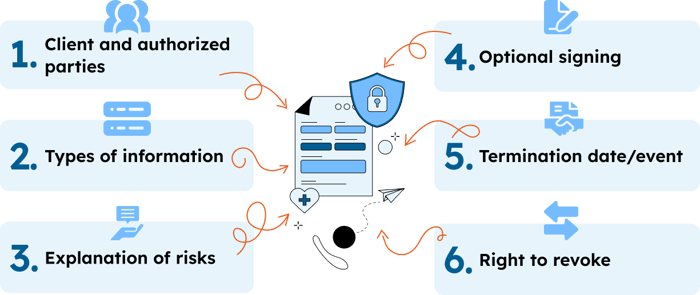
A well-designed Request for Alternative Communication form should:
- Identify the client and the authorized parties. Include the client's name and who they are authorizing to send non-secure messages, so the request is clear and specific.
- Specify what types of information may be sent. List the types of information that can be sent non-securely (scheduling, billing reminders, etc.). This should not include clinical or sensitive details.
- Explain the risks. A brief, plain-language summary that helps clients understand that unencrypted messages carry a risk of being intercepted or viewed by others.
- Clarify that signing is optional. Reassure your clients that signing isn't required to receive treatment; it's their choice.
- Include a termination date or event. State when the authorization ends, whether that's a specific date or an event like "end of treatment."
- Remind clients they may revoke at any time. Let clients know they can return to encrypted communication whenever their preference changes.
Anatomy of a Request for Alternative Communication form:
💡 Need a template?
Person Centered Tech offers a free Request for Non-Secure Communication form you can customize for your practice.
Step 3. Document everything
Preference changes must be added to the client's clinical record (typically in your EHR).
Step 4. Make switching back to secure communication effortless
When a client wants to return to secure communication, keep it simple. A verbal or written request should be enough to update their preference.
How Hushmail Supports a Compliant Workflow
- Keeps your secure option available at all times. You can toggle encryption on whenever the content becomes sensitive.
- Protects sensitive information from the first message. When someone reaches out via the secure form on your website, their information is protected before they even become a client.
- Reduces workflow risk. All messages and form submissions arrive in a single inbox, minimizing steps and reducing the risk of mistakes.
- Supports your HIPAA compliance. Every Hushmail for Healthcare plan includes a BAA.
As Dalton emphasizes:
“Even at first contact, if someone reaches out about future healthcare services, that information is PHI — and it must be protected. Secure forms aren't optional; they're essential.”
Liath Dalton, Director, Person Centered Tech
Key Takeaways
- HIPAA cannot be waived.
- A client request for non-secure communication only waives the Transmission Security Standard for those specific messages, not HIPAA itself.
- Providers must still use a system with a BAA and maintain a secure communication option that clients can return to.
- Sensitive or clinical information should never be sent non-securely.
- Client preference changes must be documented.
Offering both secure and non-secure (client-requested) options isn't just a compliance requirement. It demonstrates your commitment to privacy, respect, and informed client choice.
And with the right tools and process, it doesn't have to be complicated.
Client wants regular email or text?
See how Hushmail helps you document client requests for regular email or text.
Frequently asked questions
What is the so-called "HIPAA Waiver"?
What clinicians commonly call a "HIPAA waiver" is actually a client's written Request for Alternative Communication, permitted under the HIPAA Privacy Rule.
Does the waiver cover all communication with a client?
No. It specifies that certain types of low-risk information, such as scheduling or billing, can be sent over unencrypted channels. Sensitive clinical details shouldn't be sent non-securely, even with a signed request.
What if a client wants to switch back to secure communication?
You should accommodate their preference. A simple request, by email or in conversation and documented, should be enough. Your workflow should make this easy.
How long is the waiver valid?
It depends on what's in the form. You can set a termination date or tie it to an event, such as the end of treatment. Clients can also revoke it at any time.
Reviewed by: Liath Dalton, Director of Person Centered Tech, and Steven O. Youngman, VP of Legal and Compliance, Hushmail.